


New article
Recently updated
Troubleshooting filing errors to shared personal OneDrive folders

Who is this article for?
users who are receiving a filing error of 400 bad request when filing to a shared personal OneDrive folder.
no special access is required.
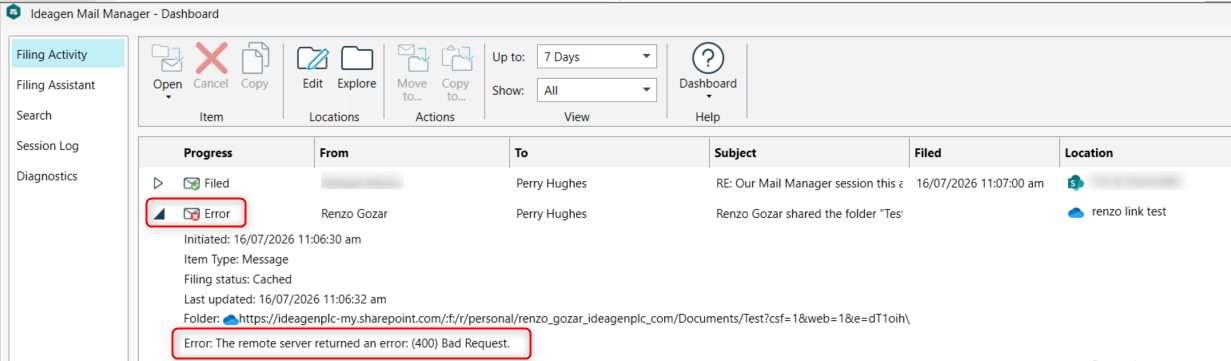
If you file emails to a shared personal OneDrive folder, you may encounter a (400) Bad Request error due to recent changes in how Microsoft handles shared OneDrive folders.
Identifying the issue
To view filing errors in your Mail Manager Dashboard:
- Go to Mail Manager.
- Select Status.
- Choose Filing activity.
You will see filing errors with the (400) Bad Request message for shared OneDrive filing locations.
Understanding the cause
Microsoft recently changed how it handles OneDrive folders that someone shares with you. These shared folders used to behave like a SharePoint library behind the scenes, and Mail Manager relied on that behaviour. Microsoft has now separated them out, so the old method Mail Manager uses to find and file into that folder no longer works, which causes the 400 Bad Request error.
Resolving the issue
The Mail Manager team are aware of this issue and have completed a fix for Mail Manager version 15.3 which is due out around September/October2026 (dependent on software testing).
Note: The only workaround at this stage is to move the shared OneDrive filing locations to a SharePoint folder and recreate the location to the new path, as SharePoint is specifically designed for sharing where personal OneDrive folders are not intended for this purpose.