


New article
Recently updated
Using filed folders in complex scenarios

Who is this article for?
Users who use the filed folders setting in complex scenario's.
No special permissions are required.
The Mail Manager filed folders after filing setting allows you to drag and drop emails to file, but certain complex scenarios can produce unexpected results or errors.
Accessing the filed folders setting
To configure the filed folders setting:
- Go to Mail Manager.
- Select Tools.
- Choose User Preferences.
- Select After Filing.
- Choose Filed folders.
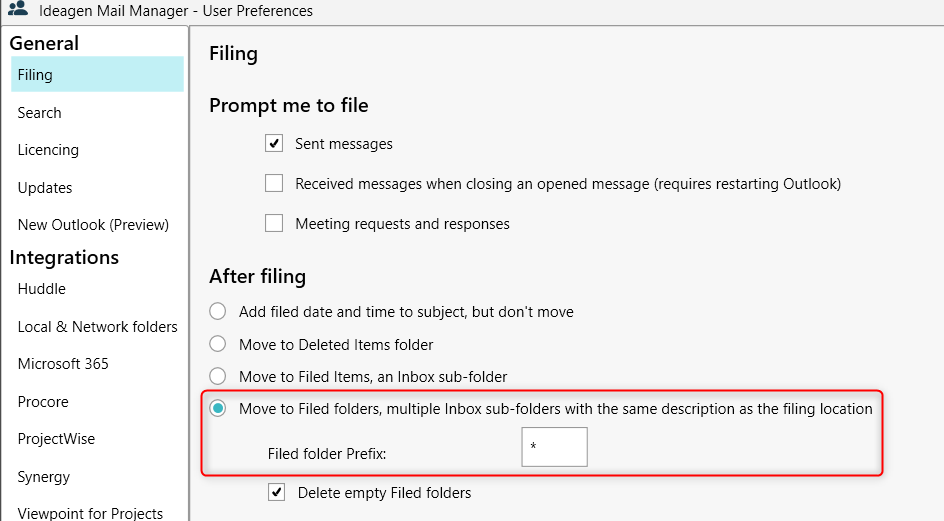
Understanding common issues
The following scenarios can cause confusing results or errors due to how the filed folders setting works.
Managing shared mailbox access with different settings
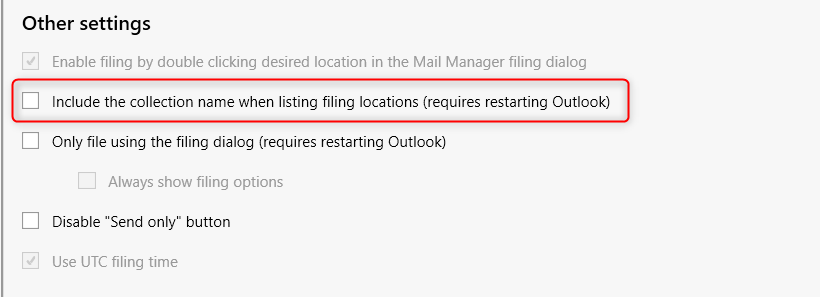
When multiple users access a shared mailbox with different Mail Manager after filing settings or collection/folder naming settings, Mail Manager creates filed folders under the inbox of the mailbox you are filing from. This means filed folders appear underneath the inbox in the shared mailbox, with the collection name added to the folder (if enabled in user preferences).
This can create inconsistent folder names. For example, one folder might be named * Projects - project 123 whilst another is named * Project 456.
To resolve this issue:
- Go to Mail Manager.
- Select Tools.
- Choose User Preferences.
- Select Other settings.
- Ensure all users have the same after filing setting through the global preferences.
- Ensure all users have the same collection naming setting (either on or off).
Resolving errors from deleted or changed filing locations
When Mail Manager filed folders are active with emails in them, Mail Manager attempts to file these emails every 10 minutes. However, if the linked Mail Manager filing location has been deleted or changed, this causes recurring filing errors in your Mail Manager dashboard.
Symptoms include multiple filing errors with statuses of Pending (cached) or similar that keep returning.
To resolve this issue, choose one of the following options:
- Delete the filed folder and its emails
- Recreate the filing location
Note: This is an edge case scenario that can be difficult to identify.