


New article
Recently updated
ProjectWise Integration

Who is this article for?Ideagen Mail Manager Users that want to use Ideagen Mail Manager with Bentley ProjectWise.
Ideagen Mail Manager and the Bentley ProjectWise Explorer must be installed.
Ideagen Mail Manager supports the filing and searching of messages filed in ProjectWise.
This article outlines how to configure integration with ProjectWise.
1. Prerequisites
Installation of Bentley ProjectWise Explorer (Version: 08.11.11.574 or higher).
2. Enable ProjectWise integration via User Preferences
See: How to Set User Preferences for ProjectWise Integration
Important Note: You will be prompted to enter your ProjectWise credentials if they are different to your Windows login details. This is a onetime prompt, unless your password has changed.
3. Add a ProjectWise Location
- Select the Locations button from the main Outlook window i.e. Tools > Locations:
- The locations window will appear.
- Select the required collection in the left-hand pane, then select the Add Location button, the Add Location window will appear:
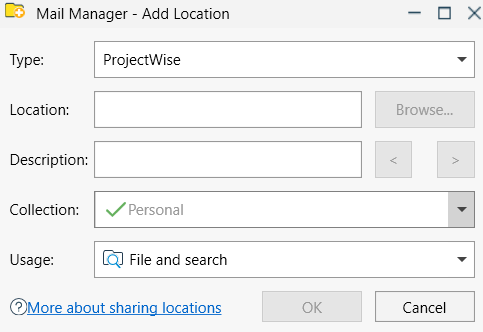
- Type select ProjectWise from the drop down menu
- From your ProjectWise Explorer select the destination folder for the messages and copy the full path from the address bar to the clipboard e.g. \\Server01.com_01:PW_123345-01\Documents\Emails\
- Location paste the path into the Location text field
- Description enter a suitable description for the location or use the < & > buttons to choose a folder name. The description can be updated at any time via the Locations Tool
- Collection select the required collection from the drop down menu
- Select OK
Note: ProjectWise locations are not verified like they are for local and network folders, therefore the locations status column will be empty.
4. Add multiple locations
Multiple locations can be added using the following methods: